> ## Documentation Index
> Fetch the complete documentation index at: https://qawolf-mktg-5213-self-service-faq-page.mintlify.site/llms.txt
> Use this file to discover all available pages before exploring further.
# How to integrate a mobile build with the QA Wolf SDK
> Upload mobile build artifacts and trigger test runs from any CI system using the QA Wolf CI SDK.
## When to use the QA Wolf SDK
This guide is for teams that do not use Fastlane or want a single, flexible way to upload mobile builds and trigger test runs from any CI system. Use the QA Wolf CI SDK if your mobile builds are produced directly in CI scripts; you want the same integration approach for mobile and web testing; you are not using GitHub Actions or prefer not to rely on prebuilt actions; or you need fine-grained control over when artifacts are uploaded and runs are triggered. This guide assumes only that your CI system can run Node.js.
## Before you begin
1. Make sure you have a CI pipeline that produces a mobile build artifact (APK, AAB, or IPA).
2. Node.js 18 or later is available in your CI environment.
3. A QA Wolf API key is stored as a CI secret (**QAWOLF\_API\_KEY**).
4. Artifact naming conventions are defined for your environments. See [Artifact naming conventions](#artifact-naming-conventions) below.
Before mobile test runs can execute, QA Wolf must enable mobile triggers for your workspace. QA Wolf will handle this and may ask you for:
* Which environments you want to test.
* Whether PR testing is enabled.
* The artifact naming conventions you are using.
* The upload and trigger method you chose.
Until this step is complete, CI jobs can upload artifacts and send deployment notifications, but mobile test runs will not start automatically.
## How the QA Wolf SDK works
The CI SDK performs two main tasks:
Upload a mobile build artifact to QA Wolf.
Notify QA Wolf of a deployment event to trigger a test run.
You can upload builds without triggering runs, which is useful during initial setup or validation.
You provide the [artifact basename](#artifact-naming-conventions) when uploading. QA Wolf applies the file extension automatically based on the uploaded file.
## Install the CI SDK
Install the SDK in your CI job:
```bash theme={null}
npm install @qawolf/ci-sdk
```
### Find the QAWOLF\_API\_KEY
Open the `Workspace name` dropdown in QA Wolf and click **Workspace Settings**.
Choose **Integrations**.
Generate your **QAWOLF\_API\_KEY** by clicking the icon to the right of **API Key** under **API Access**.
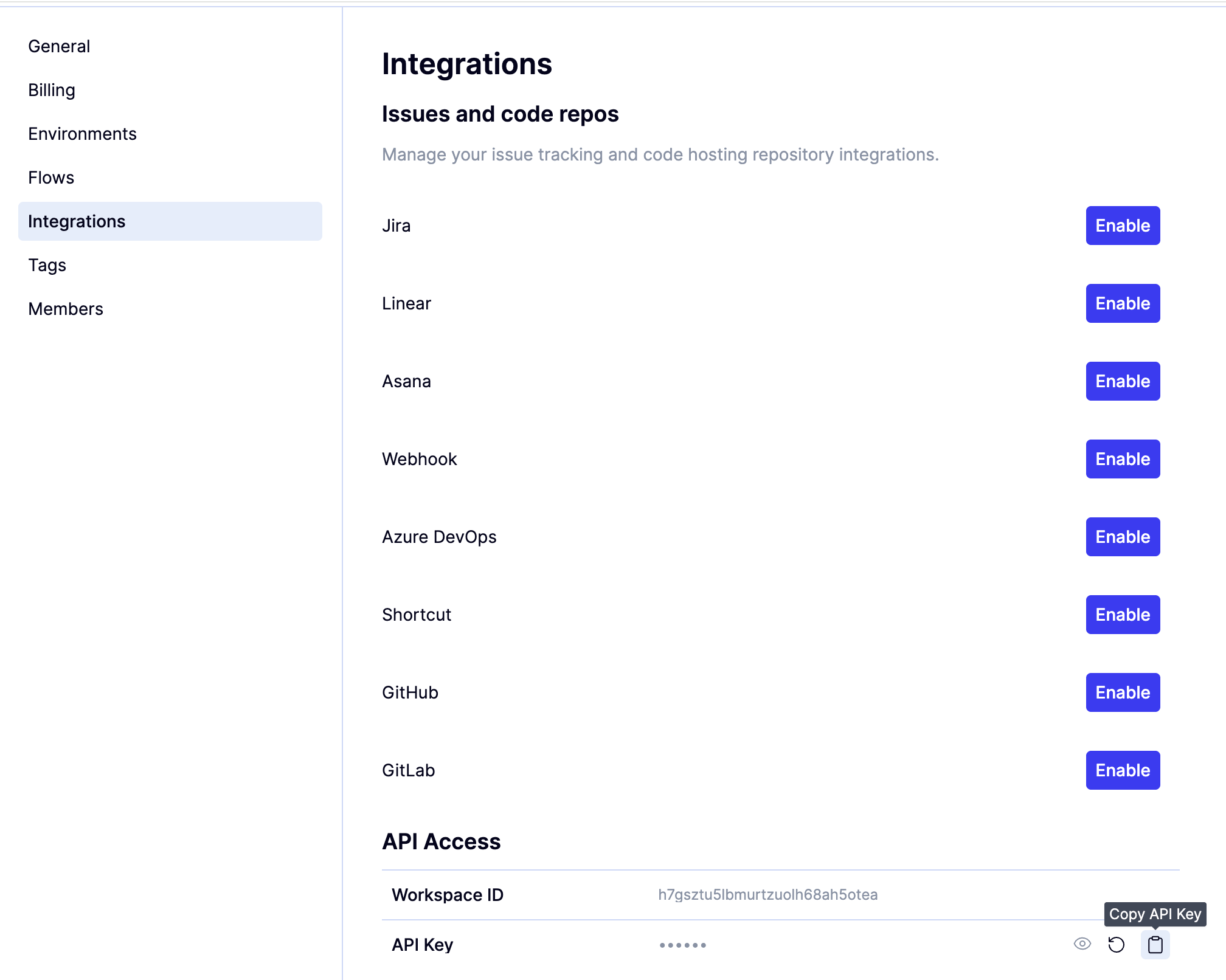 Make sure the job has access to the `QAWOLF_API_KEY` environment variable.
## Artifact naming conventions
Mobile build artifacts must follow consistent naming conventions so QA Wolf can correctly associate each build with the right environment and make failures easier to diagnose.
The artifact name is used to identify:
* Which environment the build belongs to
* Whether the build is tied to a pull request
* Which build was used for a given test run
### Static environments
Static environments are long-lived environments such as staging or release environments.
**Format**
```text theme={null}
-
```
**Example**
```text theme={null}
app-staging
```
Use the same basename every time a build is generated for the same environment.
### PR (ephemeral) environments
PR environments are short-lived and tied to a specific pull request. These are only relevant if PR testing is enabled.
**Format**
```text theme={null}
---pr
```
**Example**
```text theme={null}
app-myorg-myrepo-pr123
```
Including the organization, repository, and pull request number ensures each build can be traced back to the correct change and environment.
QA Wolf applies the file extension (.apk, .aab, or .ipa) automatically based on the uploaded artifact. You only need to provide the basename.
## Upload a mobile build artifact
After your CI pipeline produces a mobile build artifact, upload it to QA Wolf using the SDK.
**Minimal example**
```js Javascript expandable theme={null}
import { makeQaWolfSdk } from "@qawolf/ci-sdk";
import fs from "fs/promises";
const sdk = makeQaWolfSdk({
apiKey: process.env.QAWOLF_API_KEY,
});
async function uploadBuild() {
const signedUrl = await sdk.generateSignedUrlForRunInputsExecutablesStorage({
destinationFilePath: "app-staging",
});
const fileBuffer = await fs.readFile("./path/to/build.apk");
await fetch(signedUrl.uploadUrl, {
method: "PUT",
body: fileBuffer,
headers: {
"Content-Type": "application/octet-stream",
},
});
return `/home/wolf/run-inputs-executables/${signedUrl.playgroundFileLocation}`;
}
const executablePath = await uploadBuild();
```
If this step completes successfully, the artifact is uploaded and available for test runs.
**Full implementation**
The following example includes both artifact upload and deploy notification in a single script.
```js Javascript expandable theme={null}
import { type DeployConfig, makeQaWolfSdk } from "@qawolf/ci-sdk";
import fs from "fs/promises";
import path from "path";
const { generateSignedUrlForRunInputsExecutablesStorage, attemptNotifyDeploy } =
makeQaWolfSdk({
apiKey: "qawolf_xxxxx",
});
(async () => {
const playgroundFileLocation = await uploadRunArtifact("/FileLocation");
if (playgroundFileLocation) {
const deployConfig: DeployConfig = {
branch: undefined,
commitUrl: undefined,
deduplicationKey: undefined,
deploymentType: undefined,
deploymentUrl: undefined,
ephemeralEnvironment: undefined,
hostingService: undefined,
sha: undefined,
variables: {
RUN_INPUT_PATH: playgroundFileLocation,
// for mobile apps, the team may request that you use a different
// variable name here, such as ANDROID_APP
},
};
const result = await attemptNotifyDeploy(deployConfig);
if (result.outcome !== "success") {
// Fail the job.
process.exit(1);
}
const runId = result.runId;
}
})();
async function uploadRunArtifact(filePath: string): Promise {
const fileName = path.basename(filePath);
const signedUrlResponse = await generateSignedUrlForRunInputsExecutablesStorage({
// for mobile apps, we prefer static filenames based on the environment name
// for example, use `app_staging.apk` for the Staging environment
destinationFilePath: fileName,
});
if (
signedUrlResponse?.success &&
signedUrlResponse.playgroundFileLocation &&
signedUrlResponse.uploadUrl
) {
const fileBuffer = await fs.readFile(filePath);
const url = signedUrlResponse.uploadUrl;
try {
const response = await fetch(url, {
method: "PUT",
body: fileBuffer,
headers: {
"Content-Type": "application/octet-stream",
},
});
if (!response.ok) {
return "";
}
} catch (error) {
return "";
}
// for mobile apps, we request that you include this prefix path
// return `/home/wolf/run-inputs-executables/${signedUrlResponse.playgroundFileLocation}`;
// for other apps
return signedUrlResponse.playgroundFileLocation;
}
return "";
}
```
## Trigger a test run
After uploading the artifact, notify QA Wolf that a new deployment is ready for testing.
```javascript theme={null}
await sdk.attemptNotifyDeploy({
deploymentType: "android_app",
variables: {
ANDROID_APP: executablePath,
},
});
```
The deployment type and environment key must match the values configured by QA Wolf for your workspace.
If mobile triggers have not yet been enabled, this step will complete without starting a test run.
## Verify the integration
Run the CI job.
Verify that the artifact upload completes successfully.
Confirm that the deployment notification step runs without errors.
Once mobile triggers are enabled, check the **Runs** tab for the test run that was triggered.
## Troubleshooting and common issues
* **If uploads succeed but no runs start:** Mobile triggers may not yet be enabled. Contact QA Wolf to complete platform configuration.
* **If the artifact is not found during execution:** Verify that the artifact basename matches your naming conventions, and the returned path is used when triggering the run.
* **If you see authentication errors:** Verify that **QAWOLF\_API\_KEY** is configured correctly in your CI environment.
* **If you encounter Node.js errors:** Ensure Node.js 18 or later is available in the CI job.
Make sure the job has access to the `QAWOLF_API_KEY` environment variable.
## Artifact naming conventions
Mobile build artifacts must follow consistent naming conventions so QA Wolf can correctly associate each build with the right environment and make failures easier to diagnose.
The artifact name is used to identify:
* Which environment the build belongs to
* Whether the build is tied to a pull request
* Which build was used for a given test run
### Static environments
Static environments are long-lived environments such as staging or release environments.
**Format**
```text theme={null}
-
```
**Example**
```text theme={null}
app-staging
```
Use the same basename every time a build is generated for the same environment.
### PR (ephemeral) environments
PR environments are short-lived and tied to a specific pull request. These are only relevant if PR testing is enabled.
**Format**
```text theme={null}
---pr
```
**Example**
```text theme={null}
app-myorg-myrepo-pr123
```
Including the organization, repository, and pull request number ensures each build can be traced back to the correct change and environment.
QA Wolf applies the file extension (.apk, .aab, or .ipa) automatically based on the uploaded artifact. You only need to provide the basename.
## Upload a mobile build artifact
After your CI pipeline produces a mobile build artifact, upload it to QA Wolf using the SDK.
**Minimal example**
```js Javascript expandable theme={null}
import { makeQaWolfSdk } from "@qawolf/ci-sdk";
import fs from "fs/promises";
const sdk = makeQaWolfSdk({
apiKey: process.env.QAWOLF_API_KEY,
});
async function uploadBuild() {
const signedUrl = await sdk.generateSignedUrlForRunInputsExecutablesStorage({
destinationFilePath: "app-staging",
});
const fileBuffer = await fs.readFile("./path/to/build.apk");
await fetch(signedUrl.uploadUrl, {
method: "PUT",
body: fileBuffer,
headers: {
"Content-Type": "application/octet-stream",
},
});
return `/home/wolf/run-inputs-executables/${signedUrl.playgroundFileLocation}`;
}
const executablePath = await uploadBuild();
```
If this step completes successfully, the artifact is uploaded and available for test runs.
**Full implementation**
The following example includes both artifact upload and deploy notification in a single script.
```js Javascript expandable theme={null}
import { type DeployConfig, makeQaWolfSdk } from "@qawolf/ci-sdk";
import fs from "fs/promises";
import path from "path";
const { generateSignedUrlForRunInputsExecutablesStorage, attemptNotifyDeploy } =
makeQaWolfSdk({
apiKey: "qawolf_xxxxx",
});
(async () => {
const playgroundFileLocation = await uploadRunArtifact("/FileLocation");
if (playgroundFileLocation) {
const deployConfig: DeployConfig = {
branch: undefined,
commitUrl: undefined,
deduplicationKey: undefined,
deploymentType: undefined,
deploymentUrl: undefined,
ephemeralEnvironment: undefined,
hostingService: undefined,
sha: undefined,
variables: {
RUN_INPUT_PATH: playgroundFileLocation,
// for mobile apps, the team may request that you use a different
// variable name here, such as ANDROID_APP
},
};
const result = await attemptNotifyDeploy(deployConfig);
if (result.outcome !== "success") {
// Fail the job.
process.exit(1);
}
const runId = result.runId;
}
})();
async function uploadRunArtifact(filePath: string): Promise {
const fileName = path.basename(filePath);
const signedUrlResponse = await generateSignedUrlForRunInputsExecutablesStorage({
// for mobile apps, we prefer static filenames based on the environment name
// for example, use `app_staging.apk` for the Staging environment
destinationFilePath: fileName,
});
if (
signedUrlResponse?.success &&
signedUrlResponse.playgroundFileLocation &&
signedUrlResponse.uploadUrl
) {
const fileBuffer = await fs.readFile(filePath);
const url = signedUrlResponse.uploadUrl;
try {
const response = await fetch(url, {
method: "PUT",
body: fileBuffer,
headers: {
"Content-Type": "application/octet-stream",
},
});
if (!response.ok) {
return "";
}
} catch (error) {
return "";
}
// for mobile apps, we request that you include this prefix path
// return `/home/wolf/run-inputs-executables/${signedUrlResponse.playgroundFileLocation}`;
// for other apps
return signedUrlResponse.playgroundFileLocation;
}
return "";
}
```
## Trigger a test run
After uploading the artifact, notify QA Wolf that a new deployment is ready for testing.
```javascript theme={null}
await sdk.attemptNotifyDeploy({
deploymentType: "android_app",
variables: {
ANDROID_APP: executablePath,
},
});
```
The deployment type and environment key must match the values configured by QA Wolf for your workspace.
If mobile triggers have not yet been enabled, this step will complete without starting a test run.
## Verify the integration
Run the CI job.
Verify that the artifact upload completes successfully.
Confirm that the deployment notification step runs without errors.
Once mobile triggers are enabled, check the **Runs** tab for the test run that was triggered.
## Troubleshooting and common issues
* **If uploads succeed but no runs start:** Mobile triggers may not yet be enabled. Contact QA Wolf to complete platform configuration.
* **If the artifact is not found during execution:** Verify that the artifact basename matches your naming conventions, and the returned path is used when triggering the run.
* **If you see authentication errors:** Verify that **QAWOLF\_API\_KEY** is configured correctly in your CI environment.
* **If you encounter Node.js errors:** Ensure Node.js 18 or later is available in the CI job.